

AT&T Samsung I917 Focus Hard Reset Steps
Here is the instructions of how to hard reset your AT&T Samsung I917 Focus锛宩ust follow the steps below:
Note: The hard resets will result your samsung Focus to be set back to factory settings, all data (pictures, video, contacts, music, and so on)stored on the device will be lost, so you need to save the data to your PC before doing this.
Method 1:
- From the Home screen, tap > Settings > system about.
- Touch reset your phone if you want to reset your phone to the factory default settings.
Caution!: After resetting your phone, you must not remove the battery until rebooting is complete.
Method 2:
- Press and hold the Power key
 to power off the phone.
 - Power up the device by pressing the Camera key
 , Volume down key
  , and Power key .
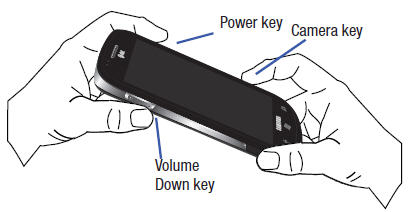
-

Note: If the download mode screen displays, go back to step 1 and try again.
- Press the Window key
 to Format the device.
- Note: Formatting erases all erases all user data stored on the device and on the microSD card.
- Press the Window key again to confirm that you want to format the device.
- Warning!: Do not remove the battery while formatting your phone. Wait until the device switches on and displays the Home screen.
When the device vibrates, release the Power key, but continue pressing the Camera and Volume down keys. Once the device displays the Are you sure you want to format? screen, release the Camera and Volume down keys.
- After formatting is complete, the Start-up Wizard screen is displayed.

Tags: AT&T, Samsung Focus, Samsung i917, Samsung I917 Focus, Samsung I917 Focus Reset hard reset i917, how to hard reset samsung i917, samsung focus hard reset, samsung i917 reset code, master reset samsung i917, reset i917, samsung focus download mode, factory reset samsung focus, hard reset samsung i917, i917 hard reset,
